The Pillar
Week 4 is where everything connects. Saving recipes, planning meals, and Bite generating grocery lists from all of it — a feature that makes the whole system actually useful.
Grocery List Generation
Click "Generate List" on your meal plan and Bite pulls every ingredient from your planned recipes and combines them. Two recipes with chicken breast? One line with the combined amount.
The aggregation runs as a server action — direct database access, no parsing logic shipped to the browser:
const ingredients = await db
  .select()
  .from(mealPlanRecipes)
  .innerJoin(recipes, eq(mealPlanRecipes.recipeId, recipes.id))
  .where(eq(mealPlanRecipes.mealPlanId, mealPlanId));

const aggregated = combineIngredients(ingredients.flatMap((r) => r.recipe.ingredients));
Fractions work too — "1/2 cup" plus "3/4 cup" gives you "1 1/4 cups". Trickier than it looks:
function addFractions(a: string, b: string) {
  const toDecimal = (s: string) =>
    s.includes("/") ? +s.split("/")[0] / +s.split("/")[1] : parseFloat(s);

  const sum = toDecimal(a) + toDecimal(b);
  return toMixedNumber(sum); // e.g. 1.25 → "1 1/4"
}
Items auto-sort into categories: Produce, Meat & Seafood, Dairy, Pantry, Other. Each category collapses, shows item counts, and has bulk check/uncheck. There's a manual add form at the top because you'll always need stuff that's not in a recipe.
The best part is stale detection. Change your meal plan after generating a list? An orange Update List badge shows up. Regenerating keeps your checked items and manual additions while updating recipe quantities. No progress lost.
Auto-generated from your meal plan
Ingredients combined across recipes, sorted by category, with stale detection when your meal plan changes.
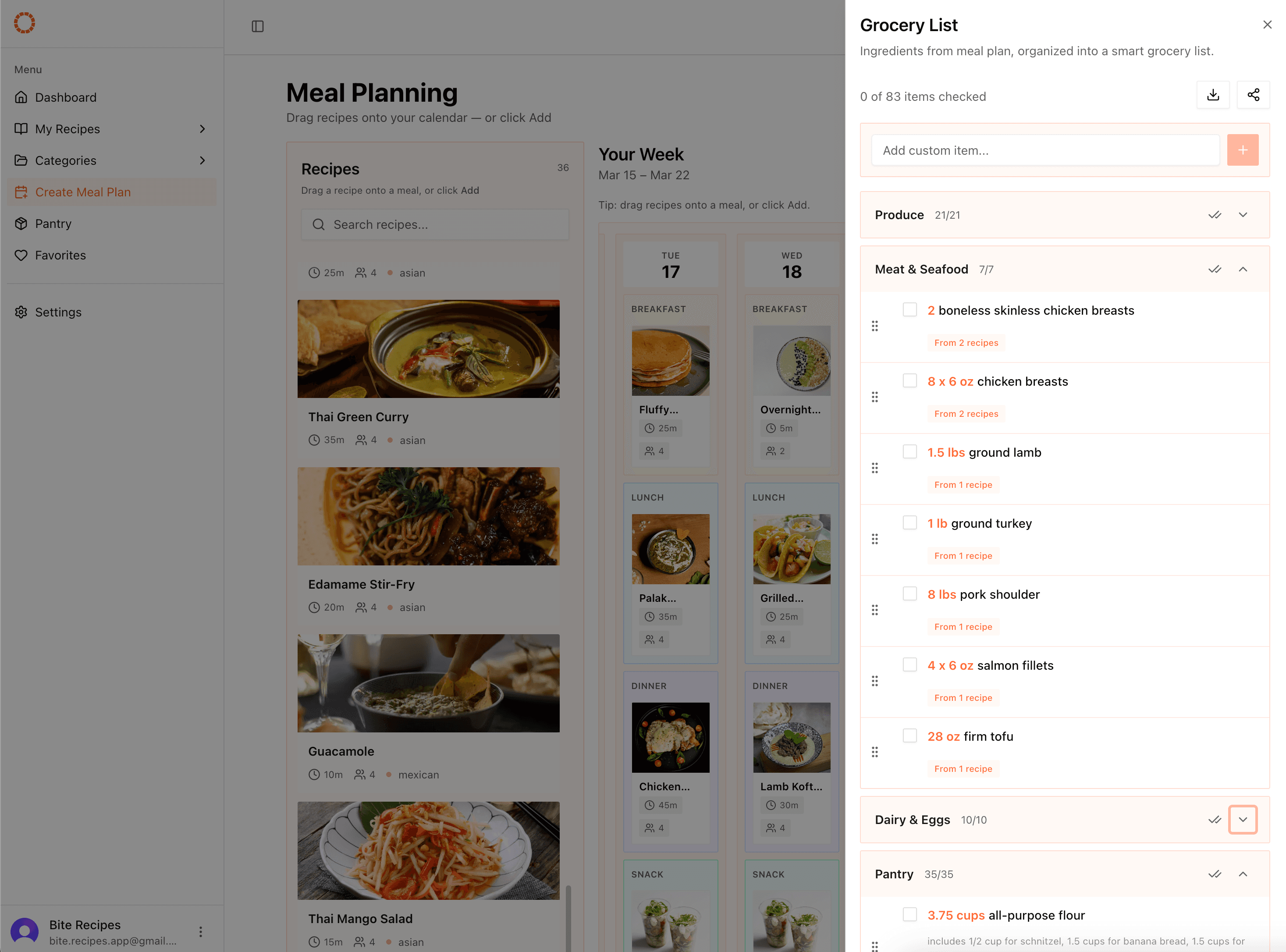
Auto-generated from your meal plan
Ingredients combined across recipes, sorted by category, with stale detection when your meal plan changes.
Phase 2: Grocery List Enhancements
The basic list worked but I wanted it to be better. Inline quantity editing — tap the amount and change it. Bulk operations for checking and clearing. Drag-and-drop reordering within categories using @dnd-kit (grip handles on hover, keyboard accessible).
Smart autocomplete for the manual add — start typing "chi" and it suggests "chicken breast" and "chili powder" from your existing recipes. Small feature but surprisingly useful.
Print generates a clean version with just categories and items. No app UI, just a list ready for paper or a screenshot.
Responsiveness on Mobile
I'd been building on desktop for three weeks and finally opened it on my phone. Things needed fixing.
The pattern I went with: full pages on mobile, drawers on desktop. One component, two presentations — the parent decides how to render it:
// Desktop: slide-out sheet. Mobile: dedicated page. Same component either way.
export default function Layout({ children }: { children: React.ReactNode }) {
  return (
    <div>
      {/* Desktop drawer */}
      <div className="hidden lg:flex">
        <Sheet>
          <GroceryList />
        </Sheet>
      </div>

      {/* Mobile page */}
      <div className="lg:hidden">{children}</div>
    </div>
  );
}
The grocery list view doesn't know if it's in a Sheet or a page — it just renders. CSS handles the switching, no duplicate logic, no conditional rendering based on screen size in the component itself.
The meal plan calendar shows a grid on desktop and a stacked list on mobile, controlled through URL search params so the server component renders correctly on first load. Recipe sidebar becomes a bottom sheet on small screens. Grocery categories get bigger tap targets.
Technical Decisions
Ingredient aggregation on the server: Could've done the combining client-side but server actions mean it runs once, consistently, with direct database access. No reason to ship parsing logic to the browser.
Category auto-assignment: A keyword map handles most of it. "chicken" → Meat, "milk" → Dairy, "onion" → Produce. Covers 90% of cases.
Testing thoughts: Started thinking about where tests would actually help. Ingredient aggregation and fraction math are good candidates — complex enough to break, pure enough to test easily. UI tests can wait since everything is still changing weekly.
Thoughts
The grocery list touches every layer of the app: database design, server-side processing, client-side state, responsive layouts, drag-and-drop, and real UX details like stale detection. This is where the "learn the full cycle" goal really showed up.
Ingredient combining was harder than I expected. Fractions, fuzzy matching ingredient names, handling missing amounts — it's a tricky problem. Kept it simple with string matching and basic fraction math. Good enough for most real cases.
Four weeks in and Bite has auth, recipe management, URL importing, favorites, categories, meal planning with drag-and-drop, and auto-generated grocery lists.