The Pillar
Week 5 is where Bite went from "app that stores recipes" to "app that actually helps you cook." Three big swings: Cook Mode for guided step-by-step cooking, a pantry for managing what you have at home, and an onboarding flow so new users land with real recipes instead of an empty dashboard.
Cook Mode
Cook Mode is a fullscreen step navigator that takes over your screen while you cook. Big text, one step at a time, swipe or tap to advance. No distractions.
Two details that make it actually work in a kitchen:
Wake Lock keeps the screen on so you're not constantly unlocking your phone with messy hands. The native API is clean — no battery hacks, released automatically on unmount:
const wakeLock = await navigator.wakeLock.request("screen");

useEffect(() => {
  return () => {
    wakeLock?.release();
  };
}, []);
Voice commands let you say "next step," "go back," or "repeat" without touching anything. The Web Speech API handles recognition, mapped to actions:
recognition.onresult = (e) => {
  const transcript = e.results[0][0].transcript.toLowerCase();

  if (transcript.includes("next")) nextStep();
  else if (transcript.includes("back")) prevStep();
  else if (transcript.includes("repeat")) readAloud(currentStep);
};
Per-step timers auto-detect things like "bake for 25 minutes" and start a countdown — you can run multiple simultaneously for recipes with parallel steps. Read-aloud narrates the current step if you'd rather listen. And the serving adjuster scales all ingredient amounts in real time while you cook.
Before each session there's a Pre-Cook Overview — all ingredients at a glance, prep steps called out separately, estimated time. It's the stuff you wish every recipe site had.
Fullscreen step navigator for your kitchen
Wake Lock keeps the screen on, voice commands let you go hands-free, and per-step timers auto-detect things like 'bake for 25 minutes'.
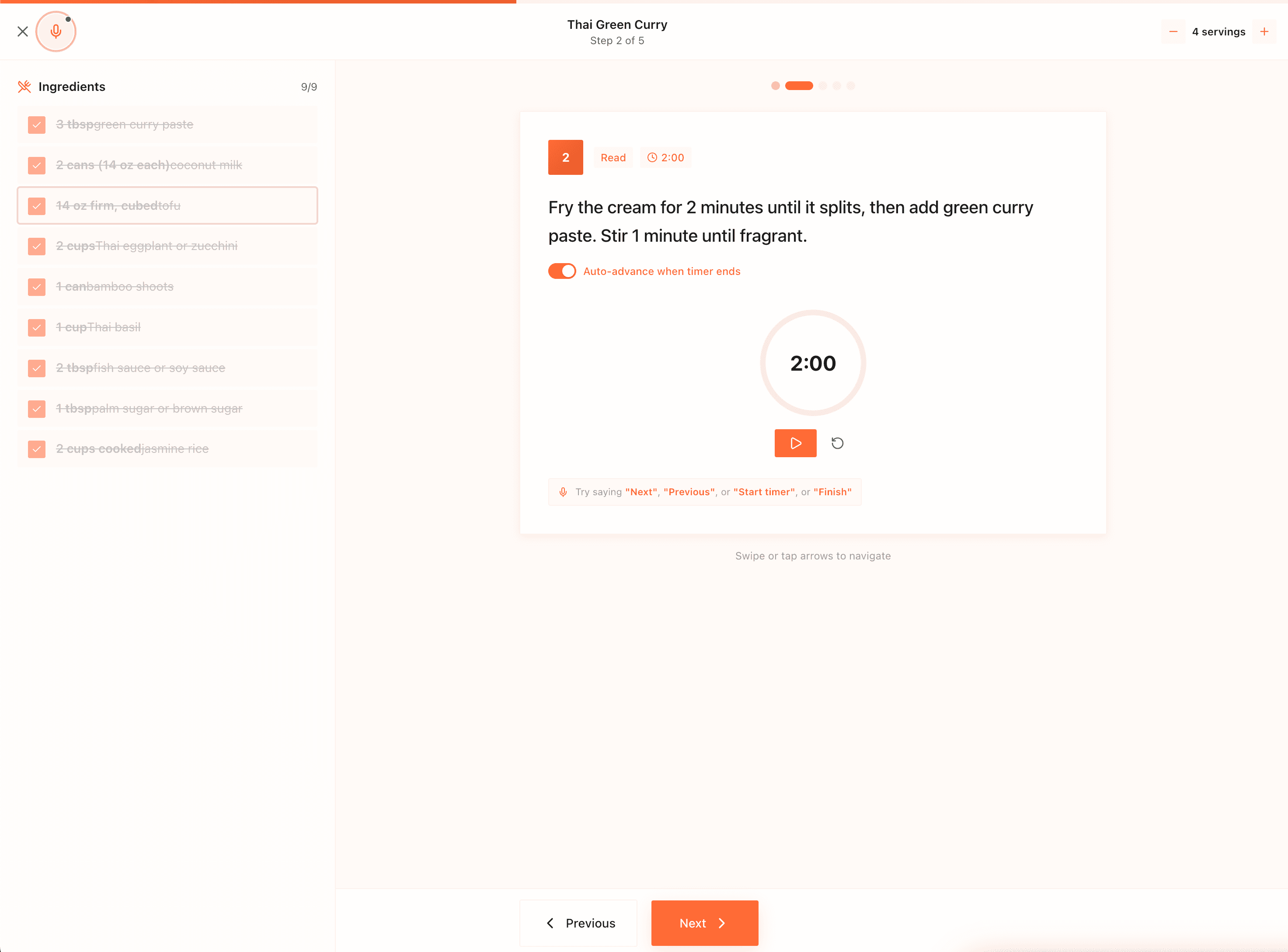
Fullscreen step navigator for your kitchen
Wake Lock keeps the screen on, voice commands let you go hands-free, and per-step timers auto-detect things like 'bake for 25 minutes'.
I also wired up cooking analytics while I was in there. Every session tracks start time, steps completed, and whether you finished. That feeds a Recharts dashboard showing weekly cooking activity, completion rates, and most-cooked recipes. Tracking abandoned sessions required a Beacon API call on beforeunload — the only reliable way to fire a request when the tab closes.
Pantry
The Pantry is inventory management for your kitchen. Add items, track quantities, set expiration dates. When something's close to expiring, it shows up in an urgency banner. The "What Can I Cook?" feature scores your saved recipes by how many pantry ingredients they require — very useful when you're staring into the fridge at 6pm.
Three input methods: manual entry with AI autocomplete, voice input (tap the mic, read off your list, Gemini parses it into structured items), and a receipt scanner. The receipt scanner is where Gemini Vision earns its keep — you take a photo of a grocery receipt and it imports everything at once.
The prompt is straightforward: send the image, ask for JSON back:
const result = await model.generateContent([
  {
    inlineData: {
      mimeType: "image/jpeg",
      data: base64Image,
    },
  },
  `Extract all grocery items from this receipt.
   Return JSON: { items: [{ name, quantity, unit }] }
   Only return JSON, no other text.`,
]);

const { items } = JSON.parse(result.response.text());
OCR would need custom parsing for every receipt layout. Gemini handles the variance without any of that.
Grocery list integration closes the loop: check an item off your grocery list and it auto-adds to the pantry. One fewer step to manage.
Know what you have, cook what you can
Track quantities and expiration dates. 'What Can I Cook?' scores your recipes by pantry ingredients. Receipt scanner via Gemini Vision imports everything at once.
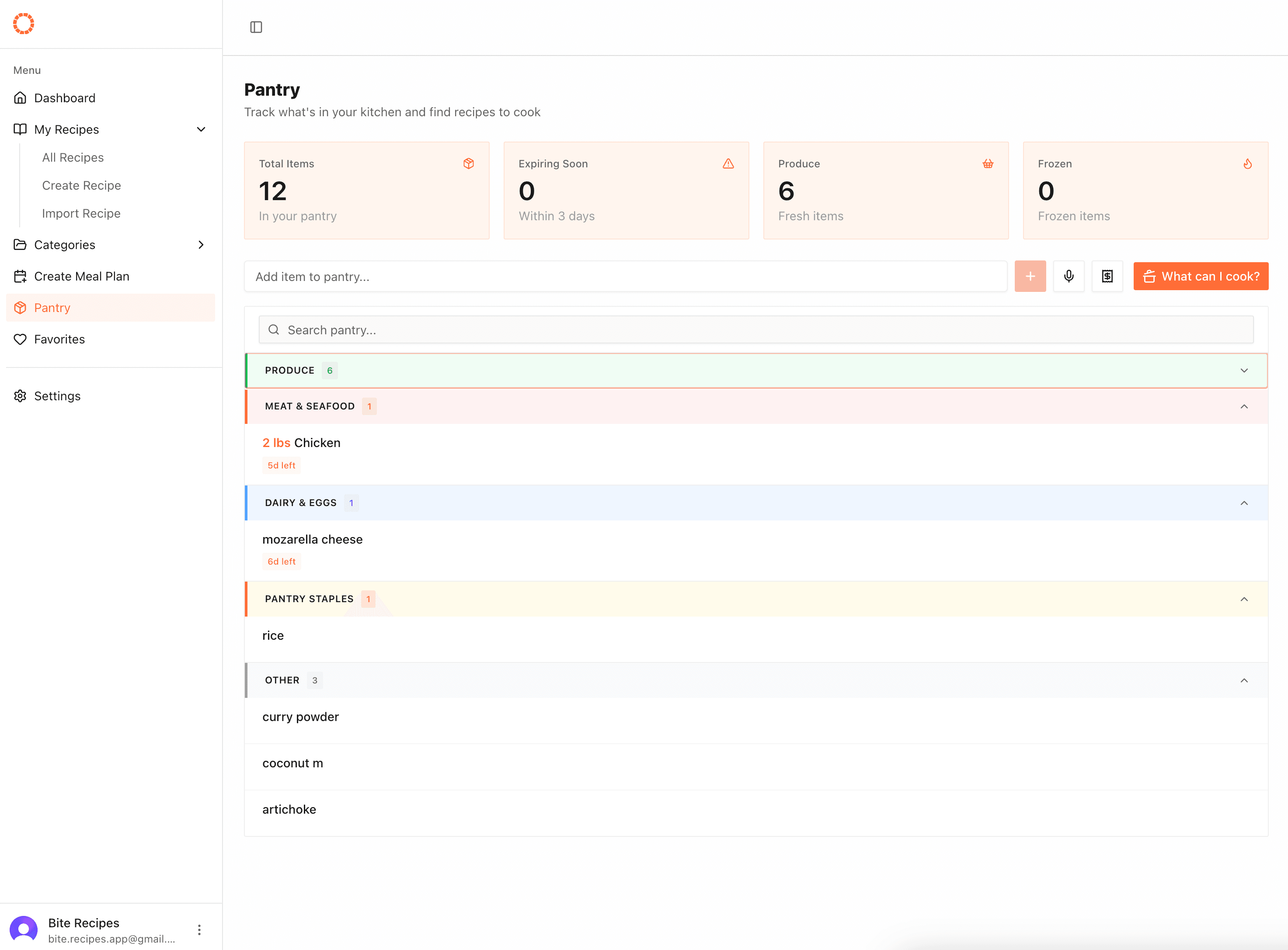
Know what you have, cook what you can
Track quantities and expiration dates. 'What Can I Cook?' scores your recipes by pantry ingredients. Receipt scanner via Gemini Vision imports everything at once.
Onboarding
New users landing on an empty dashboard is a terrible first impression. The onboarding wizard fixes that.
It's 5 screens: Welcome → Dietary Preferences → Favorite Cuisines → Cooking Skill → Time Budget. At the end, a matching algorithm scores all 61 seed recipes against your answers and copies the 18 best-fitting ones into your account as real recipes.
Dietary restrictions are hard filters — a vegan user never sees a beef recipe. Everything that passes gets scored by preference weight:
function scoreRecipe(recipe: SeedRecipe, prefs: UserPreferences) {
  // Hard filter
  if (prefs.dietary.some((r) => recipe.excludes.includes(r))) return -1;

  let score = 0;
  if (prefs.cuisines.includes(recipe.cuisine)) score += 3;
  if (recipe.skillLevel <= prefs.cookingSkill) score += 2;
  if (recipe.totalTime <= prefs.timebudget) score += 2;

  return score;
}

const matched = seedRecipes
  .map((r) => ({ recipe: r, score: scoreRecipe(r, prefs) }))
  .filter((r) => r.score >= 0)
  .sort((a, b) => b.score - a.score)
  .slice(0, 18);
Simpler than a weighted vector — and much easier to debug when something doesn't match right.
The 61 seed recipes cover Italian, Mexican, Asian, Mediterranean, Indian, American, Middle Eastern, and French cuisines with full ingredient lists, step-by-step instructions, and macro data. Each one went through UploadThing for images, same as regular recipes.
Land with 18 recipes matched to your taste
5-screen wizard covering dietary restrictions, cuisines, skill, and time budget. Hard filters first, then scored against 61 seed recipes.
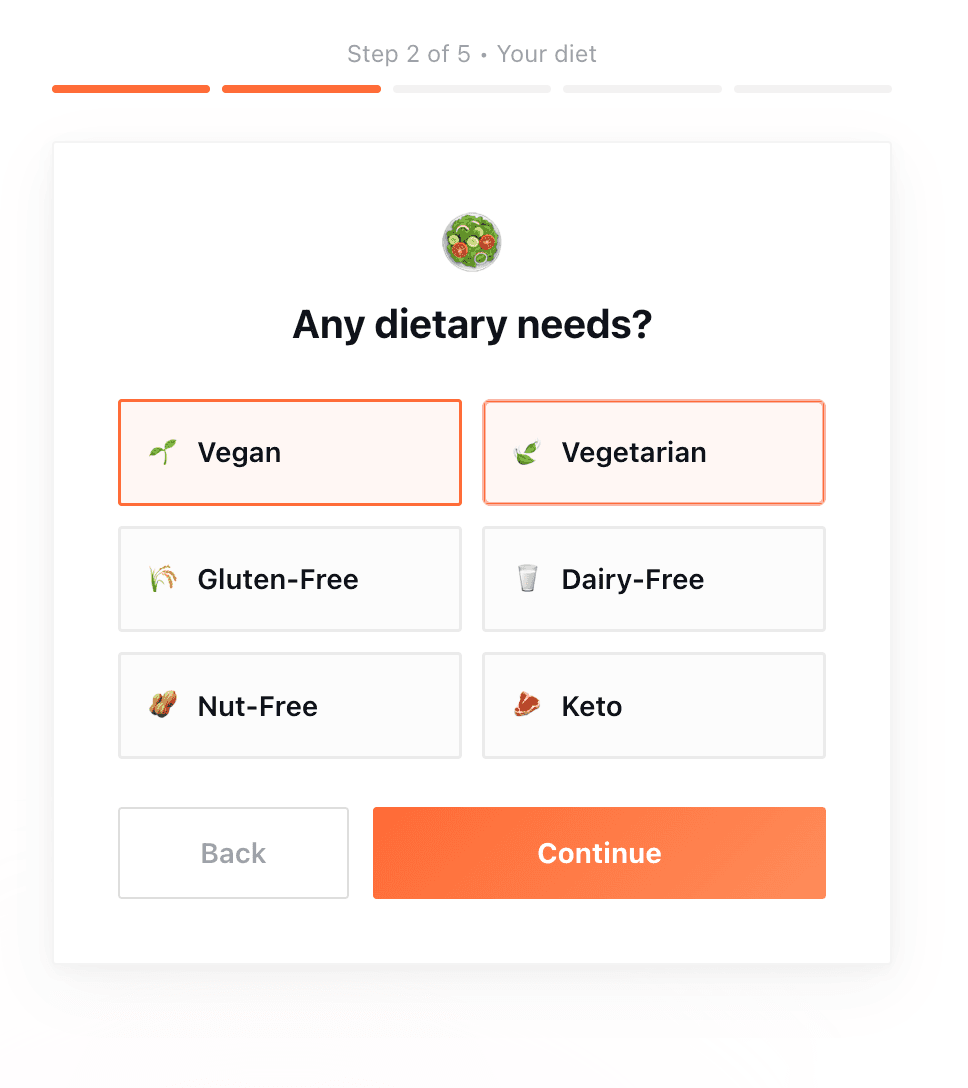
Land with 18 recipes matched to your taste
5-screen wizard covering dietary restrictions, cuisines, skill, and time budget. Hard filters first, then scored against 61 seed recipes.
Technical Decisions
Wake Lock API over hacks: Screen-on via the native Wake Lock API, released on unmount, re-requested on tab visibility change. Clean and no battery hammering.
Beacon API for session abandonment: navigator.sendBeacon() is the only reliable way to fire a request on tab close. fetch in beforeunload gets killed before it completes.
Hard filter then score: Onboarding matching runs dietary restrictions as hard eliminators first, then weights remaining recipes by cuisine match and skill/time fit. Simpler than a weighted vector — and easier to debug.
Seed recipes via UploadThing: Pexels API fetches food photography, then uploads to UploadThing. Same image pipeline as user-created recipes, so the whole app stays consistent.
Thoughts
Cook Mode was the most technically interesting feature so far. Wake Lock, voice commands, per-step timers, and session analytics are each simple individually. Combined they make something that feels genuinely polished.
Pantry was a feature I'd been putting off because it felt scope-creepy. Once I scoped it correctly — inventory, expiration, recipe matching, three input methods — it was actually pretty contained. Gemini made the receipt scanner viable in a way that would've taken weeks otherwise.
The empty-state problem with onboarding is underrated. Getting to a real first-experience with personalized content took real work: 61 recipes, a matching algorithm, a multi-step wizard, and a seeding pipeline.