The Pillar
Before building anything this week I went and read what real people complain about in meal planning apps. Spent time on r/MealPrepSunday and the pattern was obvious — people hate being locked into an app's recipe database, they hate paying $8/month for a grocery list, and they just want their own recipes on a calendar. Bite already has the "your own recipes" part. So I built the calendar.
Meal Planning Calendar
Weekly view with breakfast, lunch, dinner, and snack slots for each day. Your recipes show up in a sidebar and you drag them onto whatever slot you want.
Used @dnd-kit for drag-and-drop because FullCalendar felt like overkill. @dnd-kit gives you the pieces and you put them together however you want.
For the calendar itself I just used date-fns and Tailwind. No calendar library. The UI is specific enough that any off-the-shelf option would've been more work to customize than building from scratch. Two new tables in the database (meal_plans and meal_plan_recipes) and Drizzle migrations picked them up without touching existing tables.
Drag recipes onto any day of the week
Weekly grid with breakfast, lunch, dinner, and snack slots. Built with dnd-kit and date-fns — no calendar library needed.
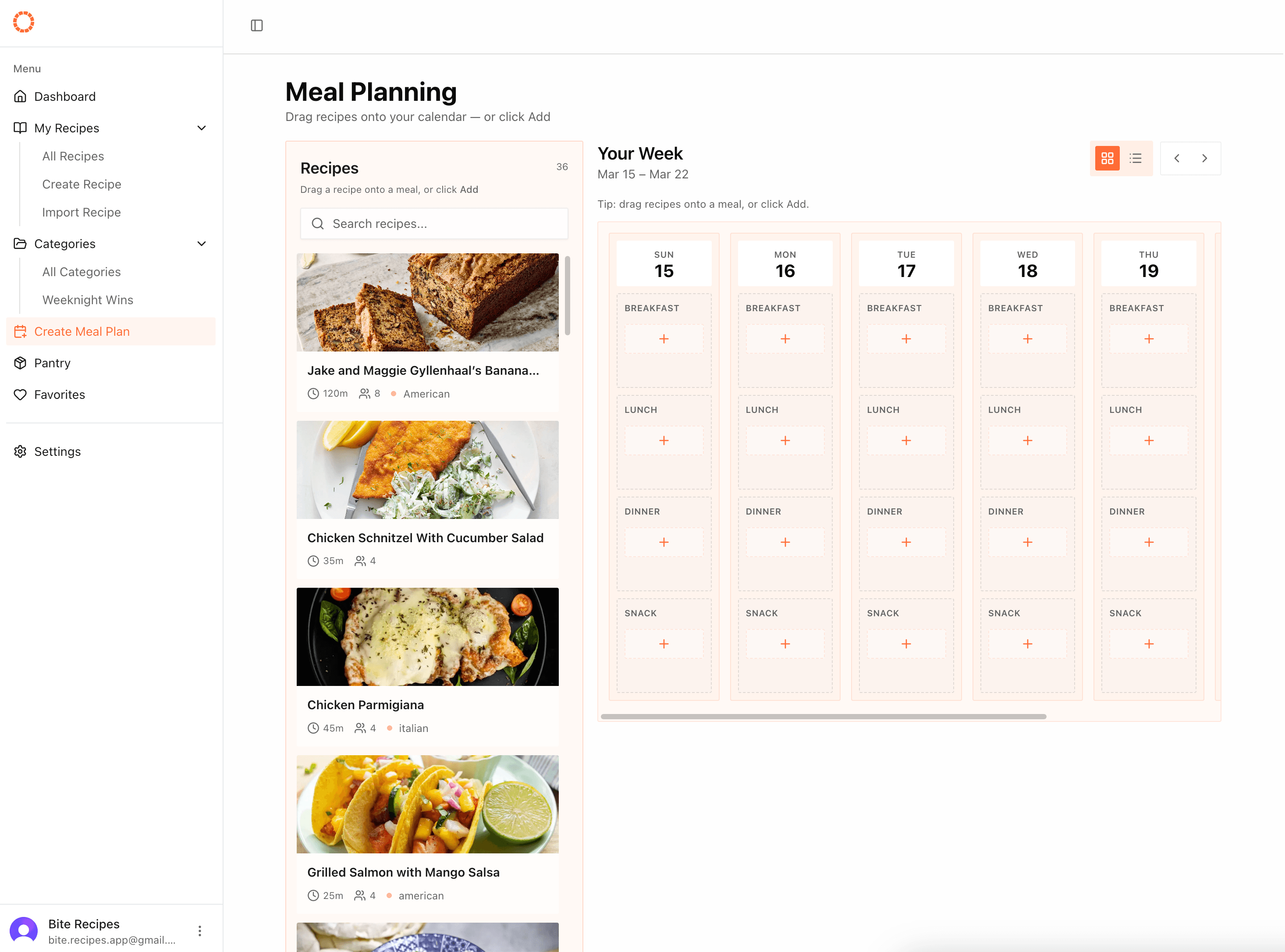
Drag recipes onto any day of the week
Weekly grid with breakfast, lunch, dinner, and snack slots. Built with dnd-kit and date-fns — no calendar library needed.
Recipe Import Enhancements
The URL importer now pulls in servings, yield, cook notes, and macros — calories, fat, carbs, protein. Both per-serving and total where available. The schema.org data usually has this, I just wasn't grabbing it before.
Enhanced recipe imports with macros
Pulls in servings, yield, cook notes, and macros — calories, fat, carbs, protein. Both per-serving and total where available.
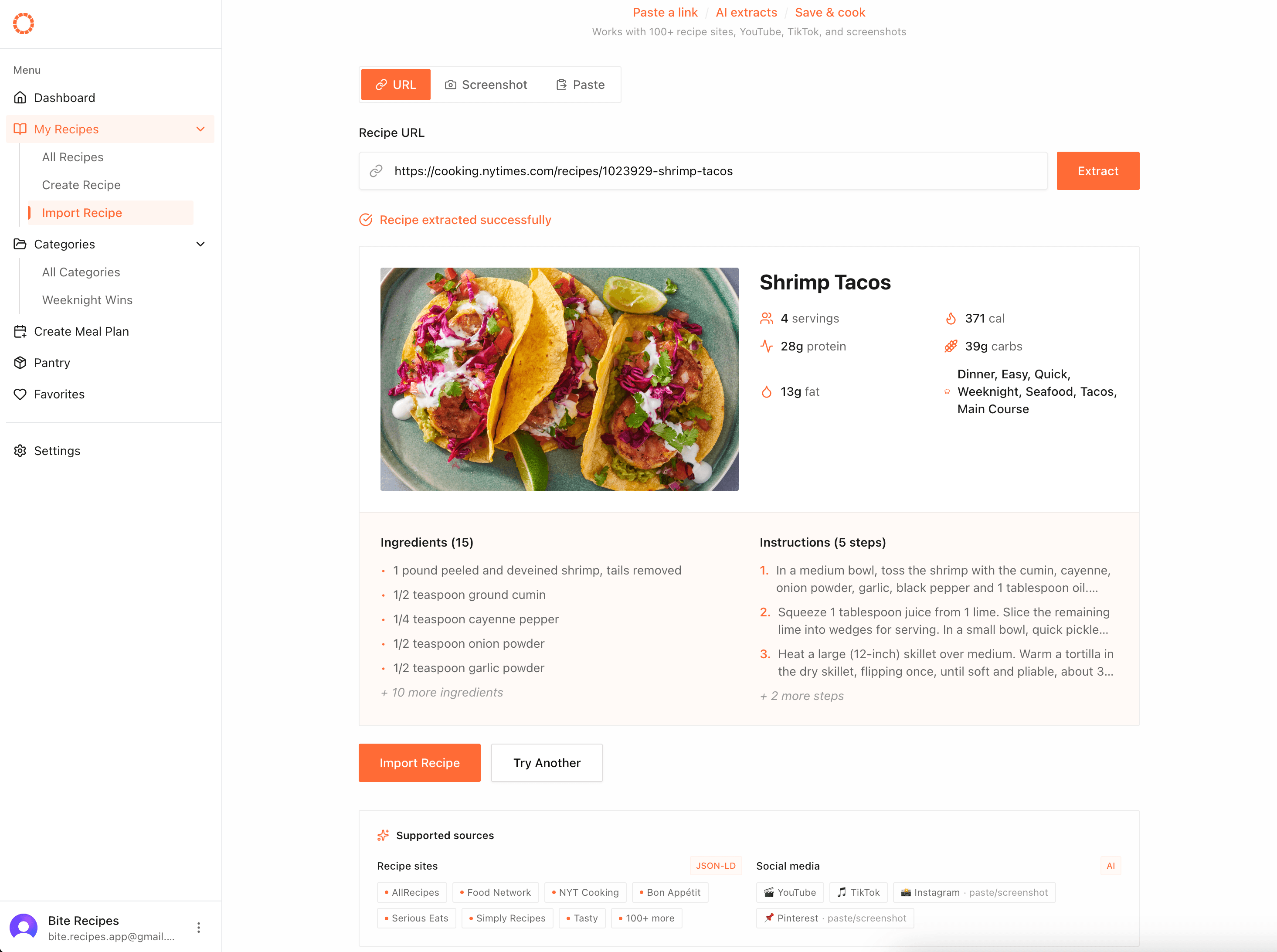
Enhanced recipe imports with macros
Pulls in servings, yield, cook notes, and macros — calories, fat, carbs, protein. Both per-serving and total where available.
The nutrition field on a schema.org Recipe looks like this:
{
  "nutrition": {
    "@type": "NutritionInformation",
    "calories": "320 calories",
    "fatContent": "12g",
    "carbohydrateContent": "45g",
    "proteinContent": "8g"
  }
}
Pulling it out is just a few extra lines on top of the existing parser:
const nutrition = schema.nutrition ?? {};

const macros = {
  calories: parseInt(nutrition.calories) || null,
  fat: parseFloat(nutrition.fatContent) || null,
  carbs: parseFloat(nutrition.carbohydrateContent) || null,
  protein: parseFloat(nutrition.proteinContent) || null,
};
Already there in the data — just needed to reach for it.
Also tightened up the image proxy. When you're fetching arbitrary URLs from user input, you want to be careful.
Technical Decisions
@dnd-kit over alternatives: react-beautiful-dnd is deprecated. FullCalendar is too heavy for what I need. @dnd-kit gives you primitives — sensors, collision detection, sortable contexts — and lets you compose them.
Custom calendar over a library: date-fns + Tailwind. The meal plan layout is specific enough that a generic calendar library would need more customization than building it myself.
View modes via URL params: Calendar and list view are switched through search params, not local state. The server component reads the param directly and renders the right view — no useEffect, no hydration mismatch.
// app/dashboard/meal-plan/page.tsx
export default function MealPlanPage({ searchParams }: { searchParams: { view?: string } }) {
  const view = searchParams.view === "list" ? "list" : "calendar";

  return view === "calendar" ? <CalendarView /> : <ListView />;
}
The URL stays the source of truth — shareable, bookmarkable, and one less piece of client state to manage.
Thoughts
Having the recipes in a sidebar, dragging them onto a calendar, with no friction — that's what the Reddit users were asking for. The Reddit research was worth it. Real users telling you what they want is way better than guessing.
Week 4 is grocery lists — the reason you meal planning is required in the first place.